ProxyLine gives you a simple way to stay private, manage multiple accounts, and access geo-targeted content without slowing down your work. This proxy service is designed to meet practical marketing and business needs. In this article, we will analyze the core concepts, pricing logic, and practical use cases so you can decide if ProxyLine is the right fit for your workflows.
Moreover, we will walk through how the network is structured, which features matter most, and how stable the service is in daily use. By the end, you will know how to combine speed, anonymity, and control to get more value from ProxyLine without wasting budget or time.
Overview of ProxyLine
What is ProxyLine: Initial Concept
ProxyLine is a proxy provider that rents private IP addresses so you can route your traffic through dedicated servers instead of your own connection. In practice, this helps you separate work profiles, reduce blocks, and keep your real IP hidden while you browse, test, or automate tasks.
The company has been active for several years and focuses mainly on IPv4 and IPv6 proxies for business and power users, not casual free-proxy seekers. You can choose between individual proxies and shared proxies. While the former is tied to a single user, the latter is used by a small group at a lower price point.
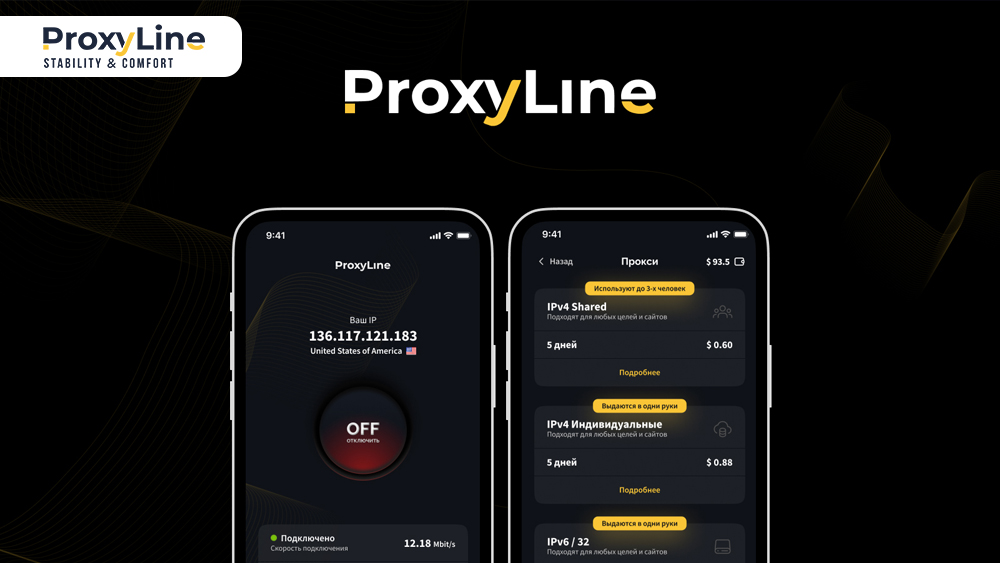
Core services include anonymous HTTP(S) and SOCKS5 proxies, city-level location choice in many countries, as well as a control panel for managing orders, renewals, and IP changes. There is also an API for larger teams that need to integrate proxy buying and rotation directly into their internal tools or scripts.
ProxyLine
In the upcoming parts, we look at the basics that matter most when you compare proxy providers: how the network is built, which features stand out, how performance holds up, and where ProxyLine is most useful in real-world scenarios.
Proxy Network and Types
ProxyLine runs a large pool of data center proxies across many networks and subnets, with both IPv4 and IPv6 options available. The infrastructure is designed for tasks that prefer stable sessions over residential IPs, such as social media management, SEO tools, classified ads, online games, and general browsing.
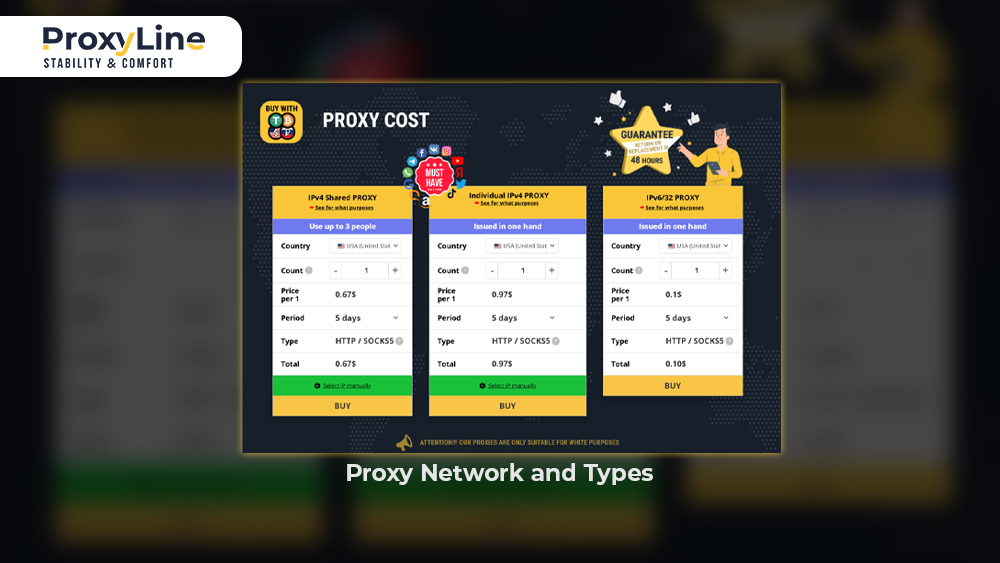
All proxies support HTTP(S) and SOCKS5 protocols, so you can plug them into browsers, bots, SEO software, and automation tools without complex workarounds. Plus, orders are handled automatically. Once payment is confirmed, the system generates access data in both protocol formats and activates proxies right away. For extra control, you can bind orders to up to three IPs, choose specific subnets, and often narrow down to a particular city.
Below is a quick overview of how the main proxy types are positioned in the ProxyLine ecosystem:
Individual IPv4 proxies: Dedicated to one customer, better for sensitive accounts and long-term projects.
Shared IPv4 proxies: Cheaper per IP, used by a small number of clients, suitable for less delicate tasks.
IPv6 proxies: Very low-cost per address, useful for bulk testing, parsing, and some automation scenarios.
HTTP(S) and SOCKS5: Protocols offered in parallel so you can match the requirements of specific tools.
Static data center IPs: Focused on stability and uptime rather than frequent IP rotation.
This mix of proxy types makes ProxyLine attractive if you want granular control over cost, anonymity level, and protocol support in one place. And while competitors like IP Royal and DataImpulse often focus on residential or mobile IP diversity, ProxyLine’s strength lies in maintaining highly stable datacenter networks for continuous workloads.
Proxy Network and Types
Performance and Reliability Evaluated
When we look at performance, ProxyLine aims for a balance between speed, stability, and anonymity. Many of their individual proxies are advertised with speeds up to around 100 Mbps. This rate is enough for heavy browsing, streaming, and running several tools in parallel. Users and third-party reviewers often highlight that pages load quickly and connections stay stable even during larger downloads or continuous scraping tasks.
Reliability is supported by a broad network footprint and continuous monitoring across thousands of networks and subnets. This diversity helps reduce mass failures because traffic can be distributed across many IP ranges instead of relying on one data center. Competitors such as 9Proxy, Bright Data and Oxylabs offer similar large-scale infrastructures, but ProxyLine provides a more budget-friendly approach for users who prioritize uptime and predictable speeds over residential-like authenticity.
On the anonymity side, ProxyLine focuses on high-level privacy with private IPv4 addresses, strict traffic separation between clients, and IP binding to limit access. Advanced users can also combine these proxies with anti-detect browsers or custom fingerprints to further reduce the chance of detection on sensitive platforms.
Such powerful performance promises to create an environment where you can run long campaigns without frequent disconnects or obvious IP leaks.
Performance and Reliability
Key Features and Benefits
From a practical angle, several features make ProxyLine excel if you use proxies daily. First is the automation layer: orders are processed instantly, proxies are activated right after payment, and renewals or IP changes can be handled in a few clicks or via API calls. This saves time when you manage dozens or hundreds of addresses for clients or internal projects.
The second pillar is flexibility. You can start from a single IP with a short rental period and scale up to large bundles with discounts for volume and longer terms. Manual IP and subnet selection, along with city-level choices in key regions, gives you fine control over where your traffic appears to come from. For security-conscious users, IP binding and a clear 48-hour refund or replacement window offer extra confidence when testing new ranges.
Overall, the key feature highlights include:
Instant activation of new orders, with all access data generated automatically.
Dual HTTP(S) and SOCKS5 support for maximum software compatibility.
Global coverage across many networks and subnets, including popular countries for marketing and SEO.
Unlimited traffic on most plans, so you are not punished for higher data usage.
Multi-functional API for ordering, checking, and managing proxies at scale.
48-hour refund or replacement guarantee if proxies do not meet expectations.
These benefits matter if you run campaigns that cannot afford long downtimes, manual order handling, or strict bandwidth caps.
Who is ProxyLine Best for: Use Cases and Applications
ProxyLine fits best when you need stable, repeatable access to the same online platforms from controlled IP ranges. Many users come from digital marketing, affiliate programs, SEO agencies, and software development teams that manage multiple accounts across several regions. Because the network focuses on data center proxies, you get predictable performance and pricing for long-running workflows.
Verified reviews also spotlight use cases like search engine parsing, rank tracking, and content monitoring, where constant availability is more important than looking like a home connection. Others rely on ProxyLine to separate business and personal usage, isolate test environments, and protect sensitive research work from direct exposure of their office IP.
To summarize, ProxyLine’s typical applications include:
Social media management: Running and warming multiple profiles while reducing lockouts.
SEO and data collection: Parsing search results, monitoring SERPs, and crawling competitor pages.
Web scraping: Harvesting product data, prices, and reviews from e-commerce or travel websites.
Online gaming: Reducing ping to certain servers or accessing region-specific game content.
Classifieds and marketplaces: Posting and managing ads without triggering aggressive anti-spam filters.
QA and development: Testing geo-targeted features and multi-region behavior in web or mobile apps.
If your main goal is reliable, scalable proxy infrastructure rather than residential-level disguise, ProxyLine can be a solid fit for both solo professionals and teams.
ProxyLine Pricing and Plans
Pricing is one of the main reasons many users shortlist ProxyLine among proxy providers. The service offers separate tiers for individual IPv4 proxies, shared IPv4 proxies, and IPv6 /32 blocks, with the cost per IP decreasing as you buy more or extend the rental period. This makes it easier to start small and then optimize your mix of individual and shared IPs as your project grows.
Below is a simplified view of how the main plan types compare on price range and best-fit scenarios. You can quickly see which option matches your budget and usage style.
On top of this, ProxyLine commonly supports promo codes. Some partner sites also list long-term discounts or special offers under labels like “ProxyLine coupon”.
All in all, ProxyLine’s pricing structure lets you mix dedicated and shared addresses. Besides, it allows you to take advantage of longer rental periods for discount levels and apply coupons at checkout to reduce overall costs while staying flexible.
How to Use ProxyLine: Step-by-Step Guide
To get real value from ProxyLine, you need a smooth setup process rather than just a list of IPs. This usage tutorial will instruct you in account creation, ordering, and configuration so you can plug proxies into your favorite tools with minimal friction. By following these steps, you avoid common mistakes that cause connection failures or bans and keep your campaigns stable from day one.
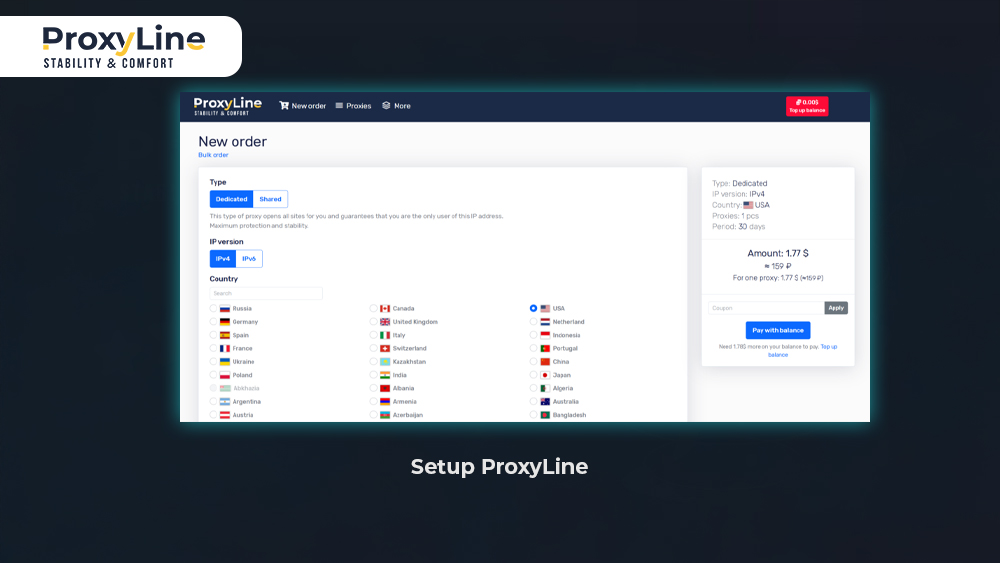
Set Up Your ProxyLine
Getting your ProxyLine account ready takes just minutes. The dashboard makes it easy to handle everything from orders to renewals. Start by signing up on proxyline.net, where you pick a plan, choose locations, and pay securely. Activation happens automatically once cleared. From there, the panel shows your active proxies, usage stats, and quick actions like IP swaps or extensions.
We recommend binding your proxies to 1-3 specific IPs right away for extra security, especially if you work from a fixed office or home setup. This stops unauthorized access and keeps your traffic isolated. Once set, copy the login details (IP:port, username, password) into your browser, scraper, or SEO tool. Formats work for both HTTP(S) and SOCKS5.
To recap, here is a simple checklist to set up and manage your ProxyLine proxies effectively:
Register and verify your account on proxyline.net.
Select proxy type (individual/shared/IPv6), country/city, and rental length.
Complete payment and note instant access data in the dashboard.
Bind to your IP(s) and test connection in a proxy checker tool.
Import into software (e.g., browser extension, ZennoPoster, or Octoparse).
Monitor usage and renew early to avoid downtime.
This process keeps your setup clean and scalable, even when running one proxy or a full pool.
Setup ProxyLine
Integration and Compatibility
ProxyLine proxies plug into most popular tools without custom tweaks, thanks to standard HTTP(S) and SOCKS5 support across the board. You can use them in Chrome or Firefox via extensions like Proxy SwitchyOmega, or in automation suites like Bright Data, Scrapy, or Puppeteer for scripted jobs. For teams, the API lets you fetch lists, check status, and rotate IPs programmatically, which speeds up bulk operations.
Configuration is straightforward: enter the proxy details in your app’s network settings, and enable authentication if needed. Popular platforms like multi-login browsers (Multilogin, GoLogin) and residential managers handle ProxyLine data center IPs well for account farming or testing. Even mobile setups, such as Android emulators or iOS proxies, work with the right port forwarding.
If you automate at scale, the API endpoints cover ordering new proxies, balance checks, and usage reports, all with simple JSON responses. This level of compatibility means you spend less time on tech hurdles and more on results, no matter your stack.
Troubleshooting & Common Support
Users sometimes hit snags like “connection refused” errors, slow speeds on certain sites, or proxies getting flagged despite binding. These often stem from mismatched protocols (try SOCKS5 for gaming/tools), firewall blocks on your end, or target sites detecting data center ranges.
Fix by verifying your IP:port in an online checker, clearing browser cache, and testing on a simple site like whatismyipaddress.com. For IP bans or dead proxies, use the dashboard to request a free replacement within 48 hours. Most issues resolve this way without tickets. If speeds drop, switch subnets or countries, as load varies by region.
ProxyLine also offers live chat on the site, email support, and a detailed FAQ covering setup guides for 20+ apps. We suggest keeping a log of working configs and reaching out via chat for real-time fixes. They respond fast during business hours.
This combo of self-help resources and direct help covers 90% of issues before they disrupt your flow.
Conclusion & Final Thoughts
ProxyLine shines for its balance of affordable private proxies, instant setup, and reliable performance across marketing, SEO, and dev tasks. We covered the network types, key strengths like API control and global reach, plus practical guides to get you running smoothly with proxyline options.
Whether you need one IP or hundreds, the flexible plans and support make it easy to scale without hassle. Check current proxyline coupon deals on partner sites and start testing today to secure your online workflows.
Frequently Asked Questions
Does ProxyLine log my activity or keep usage history?
No. ProxyLine does not store your browsing activity or destination logs to protect privacy, focusing only on connection uptime and billing data.
How often are ProxyLine IP addresses refreshed or updated in the system?
IP pools refresh regularly through network rotations, but individual proxies stay static unless you request a change. Shared ones update faster based on usage.
Is there any soft or hard limit on the number of simultaneous connections per proxy?
Most plans allow 1-10 threads per proxy, depending on the type. Individual IPv4 handles higher loads better than shared for multi-tasking.
What typical tasks can be fully automated with the ProxyLine API?
The API handles buying proxies, checking balances, listing active IPs, renewals, and replacements via simple HTTP requests.
Ready to get started with ProxyLine?
Join thousands of satisfied customers and experience the best proxy service in the industry